Batch bader in CMD
This is one sample for get bader in batches.
In CMD
Make sure the necessary software and vasp outputs (Just for First Running).
1.1 Set vasp INCAR to calculate:
LCHARG = T
LWAVE = T
LAECHG= T
LORBIT= 11
1.2 Make sure necessary_files = [“AECCAR0”, “AECCAR2”, “CHGCAR”, “POTCAR”, “CONTCAR”] in each case.
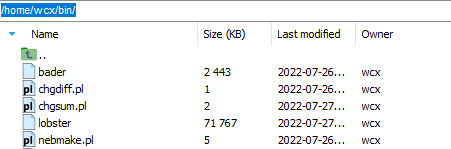
1.3 Install sure necessary_software = [“chgsum.pl”, “bader”], and with access permission.
Download: Guide: Command Mode for Extractor.
Get all sub-path by
findpathcommand:findpath -if AECCAR2

Run with fbx (featurebox):
fbx bader -j 0

Subsequent processing.
>>> # Ture to python code.
>>> # More part: The following is not in command model.
>>> # final treatment to extractor need message and formatting.
>>> from featurebox.cli.vasp_bader import BaderStartInter, BaderStartSingleResult
>>> # use  BaderStartInter or BaderStartSingleResult rather than BaderStartZero to escape repetition calculation.
>>> bsi = BaderStartInter()
>>> res = pd.read_csv("bader_all.csv")
>>> features = bsi.extract(res, atoms=[0,1,2,3], format_path=None)
>>> print(type(result))  # return one formed pd.Dataframe with necessary message.
Traditional python
Make sure the necessary software and vasp outputs. (Just for First Running).
Get all sub-path (optional).
>>> from mgetool.imports.batchfilematch import BatchFileMatch
>>> bfm = BatchFileMatch(".")
>>> bfm.filter_file_name(include="AECCAR2")
>>> paths_list = bfm.merge()
>>> paths_list = bfm.get_leaf_dir(paths_list)
>>> print(paths_list)
Run with featurebox.
>>> from featurebox.cli.vasp_bader import BaderStartZero
>>> bsz = BaderStartZero(n_jobs=4, tq= True, store_single=True)
>>> result = bsz.transform(paths_list)
>>> print(type(result))  # return pd.Dataframe
Subsequent processing.
>>> # More part: The following is not in command model.
>>> # final treatment to extractor need message and formatting.
>>> features = bsz.extract(res, atoms=[0,1,2,3],format_path=None)
>>> print(type(features))  # return one formed pd.Dataframe with necessary message.